


Save options
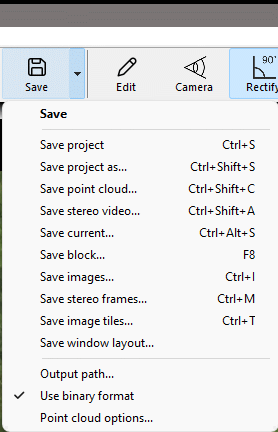
Figure 3.21: Context menu when arrow to the right of the Save button is clicked.
Clicking the save button will save the I-CONIC project so that it can be reopened later.
The context menu provides means to save additional data.
Save stereo video
Save point cloud
Save current
Save block
Save images
Output path
Use binary format
Point cloud options
Save stereo video
Choose this option to save the stereo images to a video file.
Save point cloud
Saves the currently displayed 3D point cloud to file.
You are asked if you want to open the saved point cloud with an external application.
Click Yes to open the point cloud in the application that is associated with the file format.
This is a simple way to analyze the point cloud, using e.g. a GIS.
The file is written to your default output path.
The file format is selected in the Edit dialog.
To associate an application with a file extension:
- Open file explorer
- Right click the point cloud file
- Choose "Open with..."
- Select the application
- Check "Always use this..."
Examples of point cloud viewers:
Examples of point cloud analyzers:
Save current
Choose this option to save images, point cloud, cameras, image and object coordinates for the current stereo pair to an ibt file.
By default data are saved in binary format, but you can save them in CSV (Comma Separated Values) format with menu option Use binary format.
Save block
Like "Save current" this saves images, point cloud, cameras, image and object coordinates to ibt files.
However, when this option is selected, ibt files will automatically be saved at a regular interval while playing a project to enable generation of a coherent block of all saved images.
By default data are saved in binary format, but you can save them in CSV (Comma Separated Values) format with menu option Use binary format.
Save images
Save the video frames to image files.
Output path
Whenever you save data in I-CONIC Studio, they are saved to files and folders in one and the same output directory.
If the directory has not been set, then you will be asked to select it.
If you want to change your output directory, you select "Output path" in the Save context menu.
Use binary format
If checked (default) ibt files are saved in binary format. Otherwise they are saved in CSV text format.
Point cloud options
Set if point clouds should be saved when IBT files are saved and define in which file format.
IBT files are saved when saving current or block is activated.