


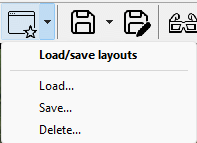
Figure 3.20: Context menu when arrow to the right of the layout window button is clicked.
Once you have configured the windows to a layout that works for you, you can save it so that you quickly can reconfigure the windows according to your favourite layout.
You give your layout a name and can then retrieve it by clicking the layout button or selecting Load in the context menu and browse to your desired layout name. The layouts are of course saved when the application is closed and reloaded when it opens.
You can save up to ten user defined layouts.
Choose Delete to delete one or more of your user defined layouts.