


Project dialog
At the top of the project dialog you select if you create a video or image project.
Video project dialog
Image project dialog
Video project dialog
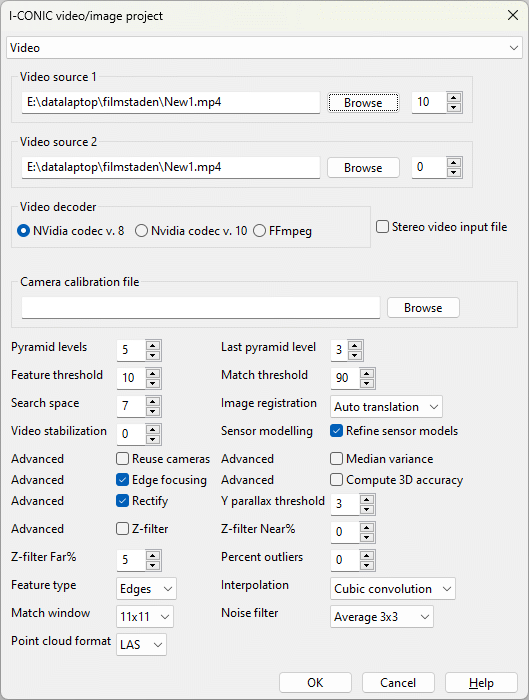
Figure 3.4: Project settings dialogs for videos
You define which video(s) and parameters to use in the project settings dialog. The dialog is opened when a new project is created.
Tool tips are available for all controls by hovering the mouse over the control you want described.
Options for video projects:
- Video source 1 and 2. Video files to process. For static scenes (or scenes with few and irrelevant moving objects) the two sources may be identical.
When you enter a video file in either of the two controls, the other is automatically set to the same video with an offset of 20 frames.
For dynamic scenes, the two sources should be two separate video files capturing the same scene synchronously with a sutiable distance between the sensors. Just browse to
the second video in Video source 2 to change the defaulted same video file.
The spin controls to the right of the video sources define the start frame of each video source. Stereo pairs and 3D models are created from video source 1, start frame 1
and video source 2, start frame 2 and then for each following pair of frames with these relative offsets. If the sources are identical, the the relative offsets
(start frame 2 minus start frame 1) indirectly define the base between the two images. If the sources are different, the relative offsets msut reflect the time
synchronization so that video source 1, start frame 1 is captured at exactly the same time as video source 2, start frame 2 so that instantaneous 3D models of moving
objects can be done.
- Video decoder. Select which video decoder to use. NVidia codec v.8 is fastest and should be used if applicable.
- Stereo video input file. If checked, the decoder will use the second video steam in the file as Video Source 2. Video files with two video streams may have been recorded by e.g. stereo video cameras.
- Pyramid levels. Hierarchical image matching is performed for each pair of frames in the two video sources. The number of pyramid levels defines the
extent of this hierarchy. This is automatically set to a reasonable value depending on video resolution.
Other settings are descibed in the edit settings section.
Image project dialog
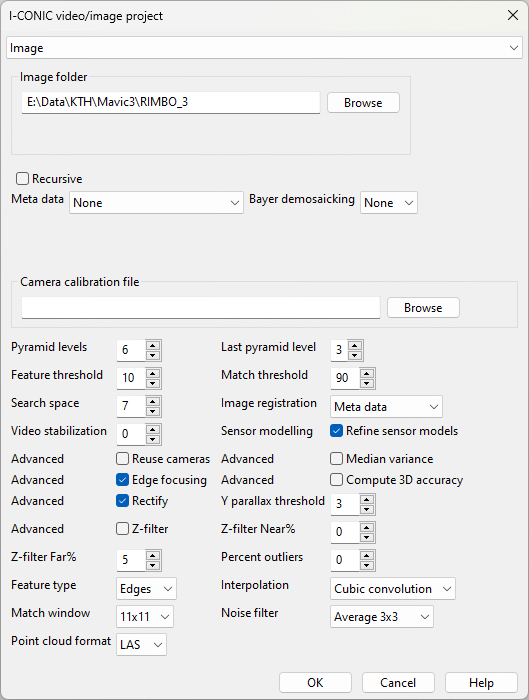
Figure 3.5: Project settings dialogs for images
You define which video(s) and parameters to use in the project settings dialog. The dialog is opened when a new project is created.
Tool tips are available for all controls by hovering the mouse over the control you want described.
Options for image projects only:
- Image folder. Select folder with image files. The files are currently traversed in alphabetical order.
- Recursive. If checked sub directories of the chosen directory will be scanned as well. If unchecked, only the selected directory is scanned.
- Meta data. Select if meta data shall be read for each image. Meta data may for example be rational polynomial coefficients in *.rpc files.
An image/object transformation is established from the rational polynomial and the extent as well as object space frame coordinates are computed.
Georeferenced thumbnails are created and displayed on the map.
- Bayer demosaicking. Some raw images are single banded with RGB pixels in 2x2 patterns with e.g red, green, green, blue. Creation of RGB from single band bayer image is selected here.
- Pyramid levels. Hierarchical image matching is performed for each pair of frames in the two video sources. The number of pyramid levels defines the
extent of this hierarchy. This is automatically set to a reasonable value depending on image resolution.
Other settings are descibed in the edit settings section.